
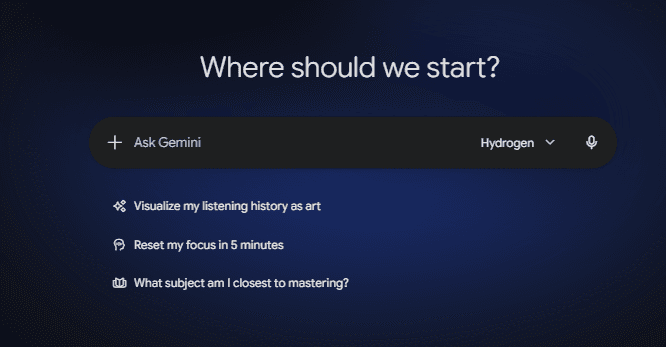
Google released Gemini 4 Hydrogen on November 12, 2026, introducing a new AI model focused on faster responses, coding, research and everyday productivity.
Instead of relying only on Google’s benchmarks and promotional examples, I wanted to see how Hydrogen handles practical tasks. I tested it with four different prompts covering Python programming, Windows 11 research, troubleshooting and instruction following.
My first impression? Gemini 4 Hydrogen produces detailed, well-structured answers, but my tests also revealed some limitations.
Here’s what I found.
What Is Gemini 4 Hydrogen?
Gemini 4 Hydrogen is Google’s latest AI model, designed to handle everyday work and multi-step tasks efficiently.
According to Google’s official announcement, Hydrogen is built for tasks including coding, debugging, research, writing and AI agents.
Google positions it as a model that can perform complex work without always requiring the more computationally demanding models in its Gemini 4 family.
One notable feature is its support for four thinking levels:
- Low
- Medium
- High (default)
- Xhigh
These settings allow developers to balance reasoning depth, speed and cost.
Google also states that Hydrogen supports a context window of up to 1 million tokens, making it suitable for working with large documents, codebases and other complex information.
But specifications alone don’t tell me whether an AI model is useful.
That’s why I decided to test it myself.
Test 1: Can Gemini 4 Hydrogen Follow Exact Instructions?
I started with a relatively simple task.
I wanted to see whether Gemini could explain a technical concept in beginner-friendly language while following strict formatting instructions.
My prompt:
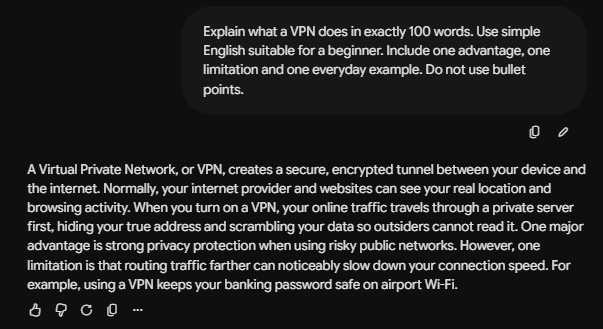
“Explain what a VPN does in exactly 100 words. Use simple English suitable for a beginner. Include one advantage, one limitation and one everyday example. Do not use bullet points.”
This may sound easy, but it tests several capabilities at once.
The model needs to explain VPN technology accurately, control its writing style, include specific information and respect an exact word count.
What happened?
Gemini produced a single paragraph explaining how VPN connections work.
It included an advantage involving privacy on public networks, a possible limitation involving reduced connection speed, and an example involving airport Wi-Fi.
The explanation was understandable and followed the requested paragraph format.
However, there was one small problem.
The response contained 99 words using a standard space-separated word count, rather than the requested 100.
This is not a major failure, but it is worth mentioning.
When I specifically request an exact word count, I expect the model to verify it.
I also noticed that the answer suggested a VPN keeps a banking password safe on airport Wi-Fi. That statement is too broad. A VPN can help protect network traffic, but it cannot guarantee password security or protect against phishing and compromised devices.
My assessment: Good readability and formatting, but imperfect precision and an oversimplified security explanation.
Read also : Are OpenAI and Anthropic’s Next AI Models Too Dangerous to Release?
Test 2: Researching Windows 11 24H2 vs 25H2
For the second test, I wanted something more technical.
I asked Gemini to explain the differences between Windows 11 versions 24H2 and 25H2.
My prompt:
“What are the main differences between Windows 11 24H2 and 25H2? Use official Microsoft documentation, include publication dates, cite the sources, and distinguish confirmed changes from speculation.”
I chose this because software release information requires factual accuracy.
A model can generate a convincing technical explanation while still getting important details wrong.
What happened?
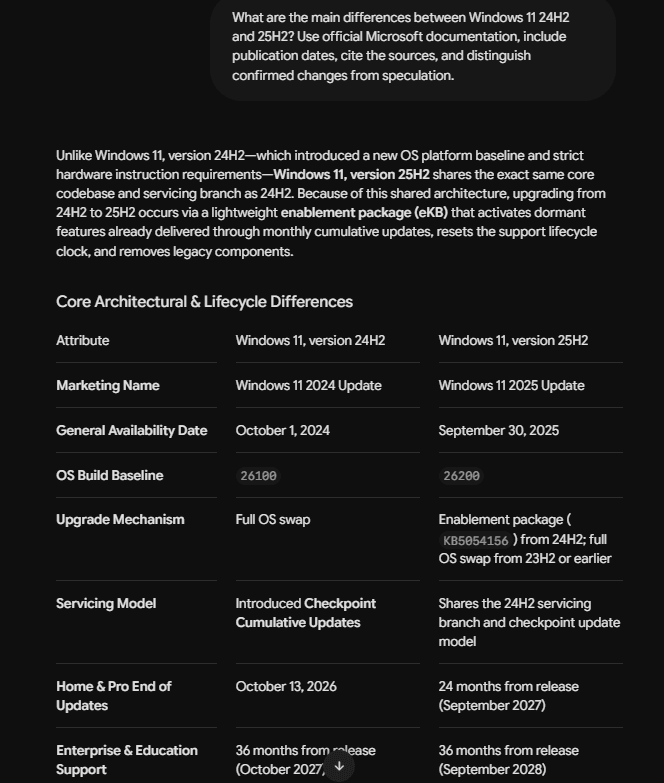
Gemini started with an explanation of the shared Windows 11 servicing architecture.
It then produced a comparison table covering several technical details, including:
- Release dates
- Operating system build numbers
- Upgrade mechanisms
- Servicing models
- Support lifecycles
The table distinguished Windows 11 24H2’s build 26100 from Windows 11 25H2’s build 26200.
It also explained the enablement-package upgrade path from a sufficiently updated Windows 11 24H2 installation to 25H2.
I particularly liked the structure.
Instead of providing several long paragraphs, Gemini organized the information into categories that made the differences easier to understand.
However, the screenshot alone doesn’t establish whether the response included accurate source citations throughout, or whether every technical claim was correct.
I would still verify the details against Microsoft’s official Windows release documentation before using them in a published guide.
My assessment: Strong organization and useful technical detail. Citation accuracy and factual completeness still require independent verification
Test 3: Can Gemini Troubleshoot a Windows 11 Problem?
For my third test, I wanted to evaluate Gemini as an IT troubleshooting assistant.
This is particularly interesting to me because troubleshooting requires more than simply knowing technical facts.
A useful assistant must identify possible causes, prioritize low-risk solutions and explain how to confirm whether a fix worked.
My prompt:
“A Windows 11 laptop connects to Wi-Fi but displays ‘No Internet’. Other devices on the same network work normally. Create a step-by-step troubleshooting plan, starting with safe checks and ending with advanced diagnostics. Explain how to verify each step.”
What happened?
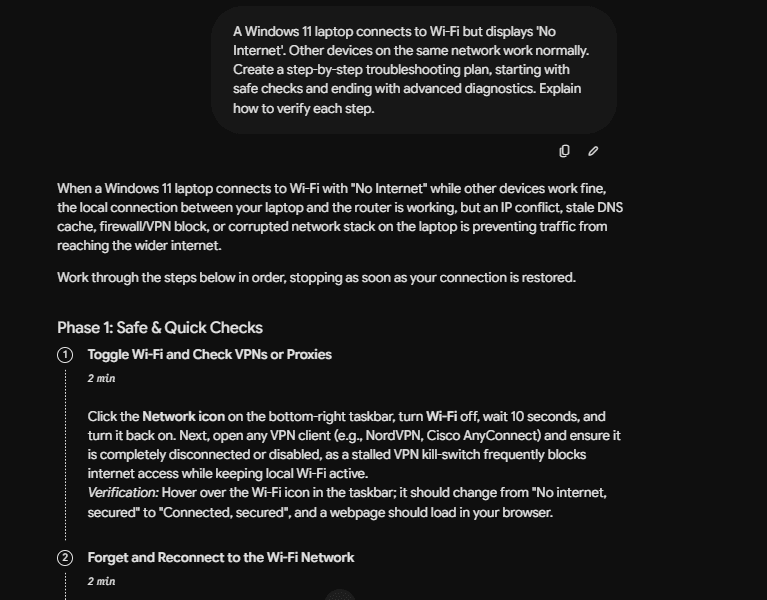
Gemini immediately identified several possible causes, including DNS problems, VPN interference, IP configuration problems and Windows networking issues.
It organized the response into troubleshooting phases, beginning with basic checks.
The visible steps included toggling Wi-Fi, checking VPN or proxy connections, and forgetting and reconnecting to the wireless network.
Gemini also explained how to check whether each action restored connectivity.
That last detail is important.
Many troubleshooting guides simply provide a list of commands without explaining what the results mean.
I prefer instructions that tell me what to verify before continuing.
What could be improved?
The initial explanation leaned toward a laptop-side networking problem before any diagnostic results were available.
Although the fact that other devices work normally makes a device-specific problem plausible, it does not establish the exact cause.
The screenshot also only shows the beginning of the troubleshooting guide, so I cannot assess the safety or usefulness of every advanced step.
Still, the visible portion was logically structured and practical.
My assessment: Promising for building initial diagnostic checklists, but the recommendations should still be checked before applying advanced network changes.
Insert screenshot 3: Gemini 4 Hydrogen Wi-Fi troubleshooting response.
Test 4: Can Gemini Write a Useful Python Script?
My final test focused on programming.
Google has emphasized coding and agentic workflows as major strengths of Gemini 4 Hydrogen.
I wanted to see how the model would approach a practical automation problem.
My prompt:
“Write a complete Python script that scans a folder containing CSV files, merges them into one file, removes duplicate rows, handles different column orders, and reports errors. Use only Python’s standard library. Explain how to run it.”
This is a useful test because CSV processing is a common real-world automation task.
It requires handling files, inconsistent column arrangements, duplicates and potential errors.
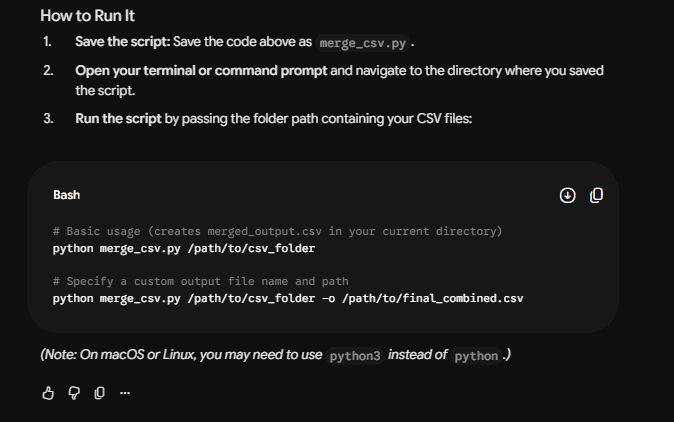
What happened?
Gemini produced a Python script and explained how to execute it.
In the screenshot, I can see that it named the script merge_csv.py and provided command-line examples showing how to specify the folder containing the CSV files.
It also included an option to define the output file location.
For example, the response showed commands in this style:
python merge_csv.py /path/to/csv_folder
The instructions were organized for someone who wanted to save the script and execute it locally.
This was a positive result from a usability perspective.
However, there is an important limitation to my test.
I have not established that the generated Python script successfully processes files, handles every specified edge case or produces correct output.
The screenshot shows the execution instructions, not a complete independently verified run.
Therefore, I would not claim the code works perfectly without testing it against sample CSV files.
My assessment: Useful code-generation workflow and clear execution instructions, but functionality remains unverified.
My Gemini 4 Hydrogen Test Results
After reviewing the four responses, here’s how I would summarize what I observed.
| Test | Observed result |
|---|---|
| Instruction following | Clear explanation, but missed the exact 100-word requirement |
| Technical research | Detailed Windows comparison with structured information |
| Troubleshooting | Logical sequence with useful verification steps |
| Python coding | Script and execution instructions generated; execution not verified |
These are qualitative observations from four prompts, not standardized benchmark scores.
I also did not record controlled response timings, so I cannot independently verify Google’s speed claims from these tests.
Is Gemini 4 Hydrogen Free?
Yes, Google has made Hydrogen available to free users, although access depends on the product.
Google’s November 12 announcement confirms that free users can access Gemini 4 Hydrogen in the Gemini app through automatic model selection when the system determines that Hydrogen is appropriate for the prompt.
That is not necessarily the same as having unrestricted manual access to every model and thinking level.
Google also lists availability through Google AI Studio, the Gemini API, Google Search and eligible business products.
Developers using the Gemini API are subject to applicable pricing and usage limits.
Google’s announced API pricing is:
| Usage | Price |
|---|---|
| Input tokens | $1.50 per 1 million tokens |
| Output tokens | $7.50 per 1 million tokens |
| Context window | Up to 1 million tokens |
These are API prices, not the price of a Gemini consumer subscription.
Google says Hydrogen uses flat pricing across its supported context window.
For ordinary users, I would start with the Gemini app before considering paid developer services.
Where Can You Use Gemini 4 Hydrogen?
Google announced Hydrogen availability across several products:
- Gemini app
- Google Search
- Google AI Studio
- Gemini API
- Gemini for business
- Google Antigravity for eligible paid subscribers
Availability, model selection and usage limits can vary between products and account tiers.
For users who simply want to ask questions or generate content, the Gemini app is the easiest starting point.
Developers who want control over thinking levels, API calls and application integrations may find AI Studio more suitable.
What I Liked About Gemini 4 Hydrogen
The biggest positive from my testing was the way Hydrogen organized information.
Across the research, troubleshooting and programming examples, the responses were structured around the task rather than generic explanations.
The Windows comparison used a table.
The Wi-Fi troubleshooting answer followed a step-by-step approach.
The Python response included instructions for using the generated script.
These details matter because an AI answer becomes more useful when it is easy to apply.
I also liked that the model generally understood what kind of response each prompt required without needing several follow-up messages.
What Still Needs Improvement?
My main concern is precision.
The VPN response missed an exact numerical requirement and made a security statement that needed more qualification.
These are relatively small issues, but they demonstrate why a convincing explanation should not automatically be treated as a verified explanation.
The same applies to research and programming.
A polished comparison table can contain errors, and a well-presented code sample can still fail when executed.
I would therefore continue to verify technical facts, test generated code and review security-related recommendations.
Is Gemini 4 Hydrogen Worth Using?
Based on these initial tests, I think Gemini 4 Hydrogen is worth trying for everyday productivity, research, troubleshooting and programming assistance.
It appears capable of generating practical, structured responses across different kinds of tasks.
However, I would not yet describe it as universally accurate, consistently faster than other models, or ready to execute production code without verification.
Those claims require more extensive testing than four prompts.
For users who need an AI assistant to explain technical subjects, create initial scripts, organize research and suggest troubleshooting steps, Hydrogen looks promising.
For critical decisions or tasks involving sensitive systems, I would still treat the output as something that needs review.
Bottom Line
Google introduced Gemini 4 Hydrogen on November 12, 2026, with a focus on everyday AI tasks, coding and efficient agentic workflows.
After testing it with four practical prompts, my impression is positive but not without reservations.
What worked well: Structured responses, useful troubleshooting steps, technical explanations and programming instructions.
What needs attention: Exact instruction compliance, factual precision and independently verified code execution.
For me, the most important takeaway is that Gemini 4 Hydrogen can be useful without being perfect.
It can help complete everyday work, but I would not confuse a polished AI response with a verified result.
And that’s exactly why testing these models with real tasks matters more than relying only on their benchmark scores.

Pingback: Gemini File Upload Failed? 8 Ways to Fix It
Pingback: Apple Mail Not Syncing With Microsoft 365? Try These Fixes First
Pingback: Stop Gemini AI Training Without Deleting Chat History
Pingback: ChatGPT Animated GIFs: I Tested 4 Prompts
Pingback: Gemini in Android Auto: What It Can Access and How to Control It