
ChatGPT can now create animated GIFs directly from a text prompt, thanks to OpenAI’s new Images 2.6 update, announced on November 4, 2026. Instead of generating only static pictures, ChatGPT can produce short looping animations, and users can request changes to the result.
I wanted to see how well this actually works, so I tested four different ideas: a little robot discovering how to create GIFs, a bouncing ball, a car driving through the desert, and an animated TechJournalAI title.
My first impression? I’m genuinely impressed. The animations look surprisingly good for something created from a simple text description. They aren’t all perfect, but I found the results much more useful than I initially expected.
Here’s how my tests went and how you can create your own animations.
What Is ChatGPT’s New Animated GIF Feature?
OpenAI introduced GIF generation as part of ChatGPT Images 2.6 on November 4, 2026.
The feature allows users to describe an animation in ordinary language and ask ChatGPT to create a looping GIF.
You can also provide an existing still image and ask ChatGPT to animate it.
According to OpenAI, users can adjust animation speed, request changes and share their creations.
The interesting part is that you don’t necessarily need a separate animation program or video editor to make a simple GIF.
For example, you can type:
“Create an animated GIF of a ball bouncing up and down with a seamless loop.”
ChatGPT can generate the animation based on that description.
Of course, generating movement is more complicated than generating a single image. The model needs to maintain visual consistency across frames while making objects move naturally.
That’s exactly what I wanted to investigate.
Test 1: A Robot Discovering How to Create a GIF
For my first test, I wanted something more creative than a basic animation.
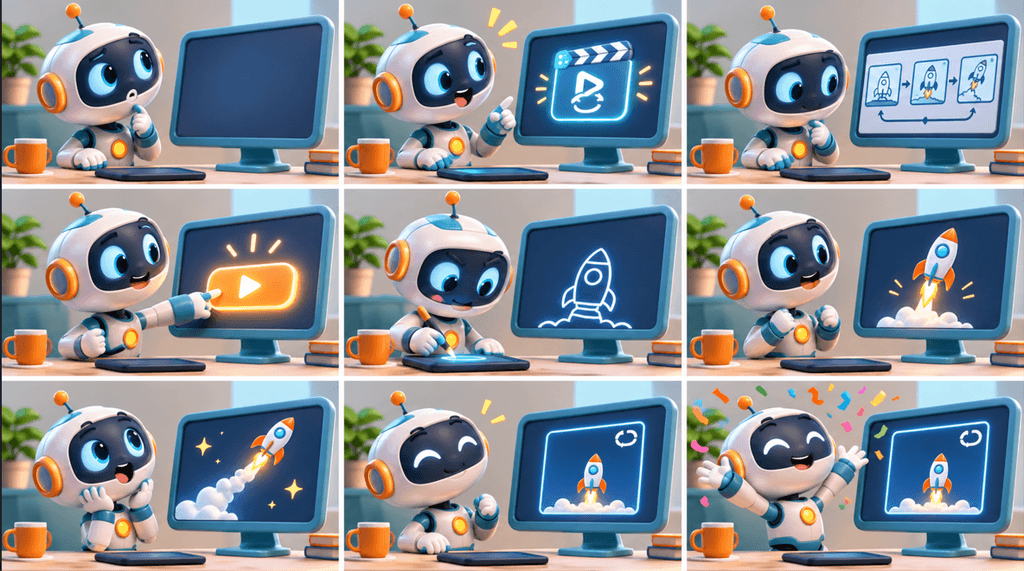
I asked ChatGPT to generate a little robot discovering that it could create animated GIFs, eventually producing a rocket-launch animation and celebrating the result.
My prompt:
“Create an animated GIF showing a friendly AI robot discovering how to make a GIF, creating a rocket-launch animation, and celebrating the result. Use nine frames with consistent characters and smooth movement.”
What happened?
This was probably my favourite concept of the four.
ChatGPT created an adorable robot sitting at a computer, discovering the animation idea, working on a rocket launch and celebrating its success.
I really liked the visual style, the colours and the character’s expressions.
The little robot looked friendly, and the overall animation concept was entertaining.
What impressed me most was how well ChatGPT interpreted the story without requiring a detailed explanation of every scene.
The output followed the main idea I had described.
The character design was also attractive enough that I could imagine using something similar in a YouTube Short or an AI-themed social media post.
There is one limitation worth mentioning: the robot example preserved for this article is a static nine-panel storyboard, rather than the playable GIF itself. I liked the original result, but the uploaded image alone doesn’t establish its playback smoothness.
My verdict: My favourite creative concept, particularly for storytelling and cartoon-style content.
Read also : Gemini 4 Hydrogen Review: I Tested Google’s New AI With Real-World Tasks
Read also : How to Stop Gemini From Using Your Chats for AI Training Without Losing History
Test 2: A Simple Bouncing Ball
Next, I wanted to test something much simpler.
The idea was to see whether ChatGPT could handle basic motion without complicated characters, backgrounds or transitions.
My prompt:
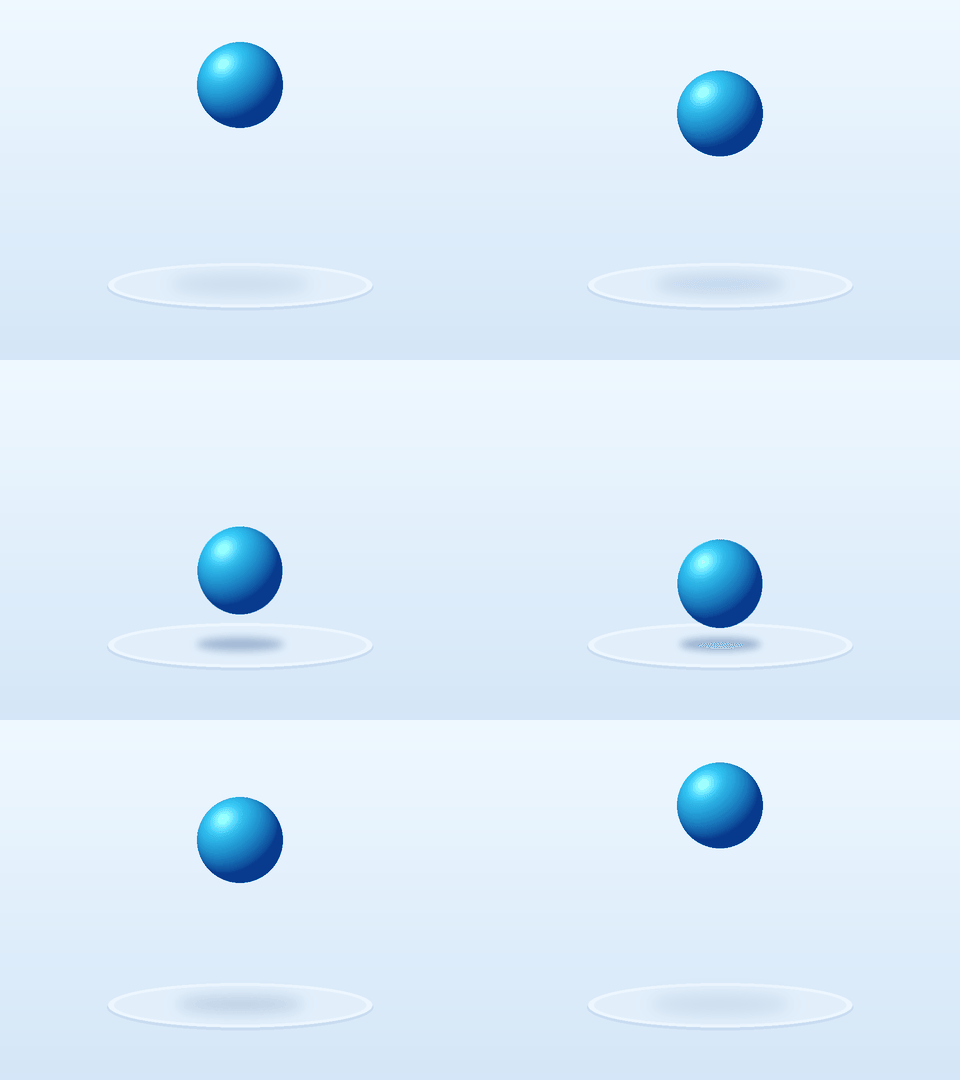
“Create a simple animated GIF of a bouncing ball with a seamless loop.”
I deliberately kept the instructions short.
What happened?
ChatGPT generated a blue ball bouncing against a light background.
The design was extremely simple, but the movement worked.
The animation showed the ball moving vertically, with a subtle shadow beneath it that helped communicate the bouncing motion.
I liked that the animation didn’t contain unnecessary visual elements.
It was exactly the kind of straightforward result I expected from such a short prompt.
The ball’s appearance remained consistent, and the animation was easy to understand.
The movement also worked well as a continuous loop.
What could be better?
The animation was visually basic.
There wasn’t much detail in the background, and the overall design was fairly minimal.
But I don’t consider that a serious weakness, because the prompt didn’t ask for anything complicated.
If I wanted a more interesting result, I could specify the background, ball material, lighting, bounce height and animation style.
My verdict: A successful basic motion test. Simple, clean and useful.
Test 3: A Car Driving Through the Desert
For the third experiment, I wanted to see how ChatGPT handled movement involving more than one element.
A moving car is more complicated than a bouncing ball because the animation needs to coordinate the car, the wheels, the road and the surrounding environment.

My prompt:
“Create an animated GIF of a car driving across a road with a moving background and a seamless loop.”
I didn’t specify a location or visual style.
I wanted to see what ChatGPT would decide on its own.
What happened?
Interestingly, ChatGPT chose a desert environment.
The result showed a turquoise car driving along a road, with mountains and a sunset in the background.
The animation had a retro, almost pixel-art appearance.
I hadn’t specifically asked for this style, but I actually liked it.
The colours worked well together, and the desert landscape gave the animation a distinctive look.
The car’s movement was also convincing enough to create the feeling of driving along a road.
Was the movement realistic?
Not completely.
At certain moments, the car appeared to accelerate more than I expected.
The speed and relative movement weren’t perfectly natural.
However, the animation still worked well as a short visual loop.
For a small decorative animation on a website or in a social media post, I think the result is quite good.
I would probably ask ChatGPT to maintain a more consistent speed if I wanted to refine it.
For example:
“Keep the car moving at a constant speed. Make the background scroll smoothly and maintain consistent wheel rotation.”
My verdict: Visually attractive and one of the most interesting results, although the movement could be more consistent.
Read also : What Is Gemini 4 Argon? Google’s New Flagship AI Model Explained
Test 4: Animating the TechJournalAI Name
My final test was different.
This time, I wanted ChatGPT to animate text instead of an object or a character.
The idea was to create a short typing animation displaying the name of my website, TechJournalAI.

My prompt:
“Create an animated GIF showing the text TechJournalAI appearing letter by letter.”
What happened?
ChatGPT created a dark background with orange animated text.
The animation gradually revealed the website name, using a typing-style effect.
I liked the minimal design.
The dark background and orange accent also worked well for a technology website.
However, this was the test where I noticed the most room for improvement.
What could be better?
The typing effect wasn’t as smooth as I would have liked.
The animation included a visible bar or cursor-like element that I didn’t really want.
I would have preferred the letters to appear cleanly, without that extra visual distraction.
The text transitions also could have been more polished.
Still, I think the final result was good considering how simple the original prompt was.
For a better version, I would use something more precise:
“Create a seamless looping GIF of the word TechJournalAI appearing letter by letter. Use a dark background and orange typography. Make the typing effect smooth, without a blinking cursor, vertical bar or additional symbols. Hold the complete text briefly before restarting.”
My verdict: A good starting point for animated branding, but the timing and text presentation need refinement.
My ChatGPT GIF Test Results
After these four experiments, I noticed an interesting pattern.
ChatGPT handled simple motion very well, while more complicated animation ideas introduced minor imperfections.
| Test | My experience |
|---|---|
| Robot discovering GIFs | Creative, attractive and my favourite concept |
| Bouncing ball | Simple movement, good looping result |
| Car driving through desert | Great visual style, some inconsistent movement |
| TechJournalAI animated text | Good appearance, but the typing effect could be smoother |
These are my observations from a small hands-on test, not a scientific comparison or benchmark.
I didn’t compare ChatGPT against dedicated animation software, and I haven’t measured generation speeds across multiple runs.
But based on the results, I think the feature is already useful for simple animated content.
How to Create Your Own Animated GIF With ChatGPT
If you want to try the new feature yourself, the process is straightforward.
Step 1: Open ChatGPT
Visit chatgpt.com and sign in.
GIF generation is being rolled out, so availability can depend on whether the feature has reached your account.
Step 2: Describe the animation
Start with a simple prompt explaining what you want to animate.
For example:
“Create a looping GIF of a small rocket launching into space.”
You don’t need to know programming or animation terminology.
Step 3: Specify the movement
For better results, I recommend adding instructions about how objects should move.
For example:
“Keep the rocket’s shape consistent. Show the flames moving naturally and make the animation loop smoothly.”
This gives ChatGPT more direction.
Step 4: Review the animation
Check the generated result carefully.
Look for unnatural movement, changing object shapes, inconsistent backgrounds or awkward transitions between the beginning and end.
Step 5: Ask for improvements
If something looks wrong, describe the problem.
You could say:
“Make the motion smoother and remove the extra objects from the background.”
OpenAI supports requesting changes to GIFs created in ChatGPT through the conversation.
When you’re satisfied with the result, save the GIF using the available controls.
What Are the Limitations?
After testing several different animation styles, I wouldn’t describe ChatGPT as a complete replacement for dedicated animation software.
There are still some limitations worth considering.
Movement isn’t always perfectly natural. In my car experiment, the animation looked good overall, but the motion sometimes felt inconsistent.
Text animation can need additional refinement. My TechJournalAI example included a cursor-like bar and could have used smoother transitions.
Simple prompts give ChatGPT more creative freedom. That can be a positive, as with the unexpected desert setting, but it also means the result may not match exactly what you imagined.
Detailed control still matters. If you want specific timing, precise transitions or consistent movement, you may need to refine the prompt or make further edits.
OpenAI also documents an important editing limitation: ChatGPT can make changes to GIFs it creates, but it does not currently support editing an animated GIF that you upload yourself in the same way.
Where Could ChatGPT GIFs Be Useful?
I can see several practical applications for this feature.
Simple looping animations could work well in social media posts, website articles, presentations and educational content.
The bouncing ball could demonstrate a basic animation concept.
The desert car could be used as a decorative loop in a technology article.
The robot concept could become a short animated illustration for an AI tutorial.
And the TechJournalAI text animation could potentially work as a small animated branding element after further refinement.
For website use, though, I would pay attention to file size and performance. GIFs can become relatively large compared with modern video formats, so I wouldn’t overload a WordPress article with unnecessary animations.
My Final Opinion: Is ChatGPT’s GIF Generator Any Good?
After trying these four concepts, I can say that I genuinely like ChatGPT’s new GIF generation feature.
The robot animation concept was particularly enjoyable, and the bouncing ball demonstrated that ChatGPT can handle simple looping movement well.
I was also impressed by the car animation. Even though the speed wasn’t completely consistent, the overall style and movement looked surprisingly good.
The animated text needed a little more work, particularly around the typing effect and unwanted cursor.
But none of these issues made the feature unusable.
What I like most is how accessible it feels.
I don’t have to open complicated animation software just to create a small animated illustration. I can describe an idea, see what ChatGPT produces and request adjustments if necessary.
My conclusion is simple: ChatGPT’s GIF generator is already very good for quick, creative animations, but more precise projects still need careful prompting and review.
For social media creators, bloggers and people who want to experiment with animated visuals, I think it is definitely worth trying.
Sources
- OpenAI — Introducing Images 2.6, November 4, 2026
- OpenAI Help Center — Images in ChatGPT
- OpenAI — ChatGPT Release Notes
Original testing: Four ChatGPT animation experiments conducted for TechJournalAI in November 2026.

Pingback: What Is OpenAI Dots? The Always-On AI Agent Explained
AI for creating a bouncing ball?
The Amiga (or rather, its prototype, Lorraine) with the MC68000 CPU could already do that back in 1984. 😉
The Amiga BOING demo
My article isn’t about AI inventing animation, but about how easily someone can now create animated GIFs using a simple text prompt, without programming or animation experience.
It’s interesting to see how far we’ve come!
There’s a Smiley. Do you know the iconic “Amiga boing ball”? It’s the most famous symbol for C= Amiga. SCNR.
But your examples aren’t AnimGIFs. Take a look at the binaries! The header doesn’t say GIF89a in ASCII (magic number in hex 474946383961), but WEBPVP8X in ASCII (magic number in hex 57 45 42 50 56 50 38 58 0a), so they’re WebP animations – something completely different and more modern (not just in terms of compression rates, WebP provides ~15 times better compression while delivering comparable quality).
GIF was developed by CompuServe (right after cuneiform :-[] ), while VP8 and its derivative, WebP, were developed by Google.
Pingback: Are New AI Models Too Dangerous to Release?