
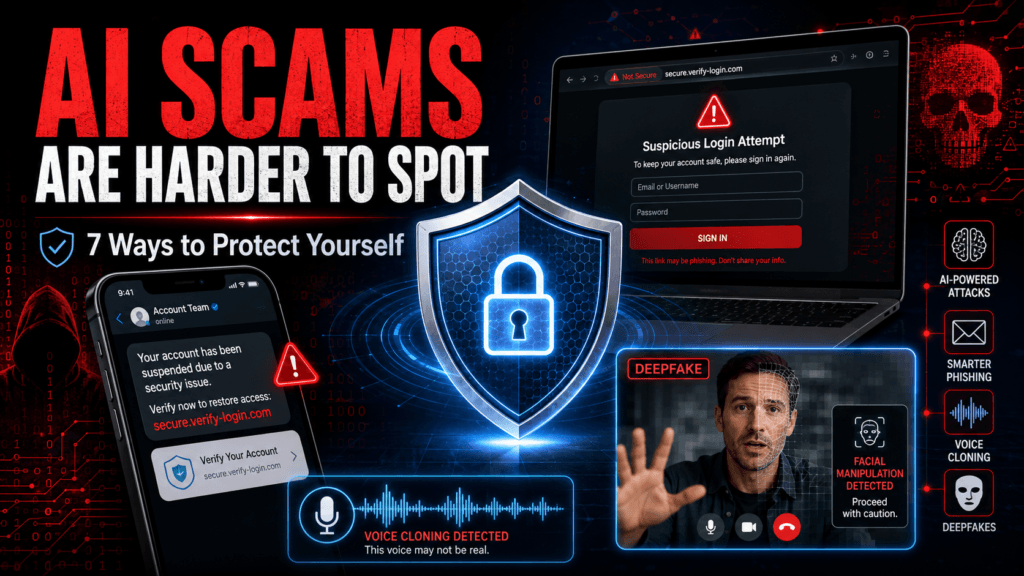
More than 100 technology, cybersecurity, financial, and infrastructure organizations are warning that AI could make cyberattacks faster, cheaper, and much easier to scale.
The group includes companies such as OpenAI, Microsoft, Google parent Alphabet, Amazon, Anthropic, CrowdStrike, Okta, and Fortinet. Their August 27 warning calls for a major increase in defensive cybersecurity before more capable AI systems become widely available to attackers.
For ordinary users, the important point is simpler: scams and account attacks are becoming easier to automate and harder to recognize.
That does not mean AI has suddenly made every security measure useless. Strong authentication, unique passwords, careful verification, and basic security hygiene still block many attacks.
What are the technology companies warning about?
The industry’s concern goes beyond fake emails.
OpenAI says increasingly capable AI models can automate parts of real-world attacks, find software weaknesses, analyze leaked credentials, and help both attackers and defenders operate at greater speed. The company argues that defenders have a limited window to strengthen systems before offensive AI capabilities become more widely available.
For consumers, this can translate into more convincing:
- Phishing emails
- Fake login pages
- Text-message scams
- Voice-cloning calls
- Deepfake impersonation
- Password attacks
- Fraudulent support messages
The danger is not necessarily that the scam is technically sophisticated. AI can make an old scam look much more believable.
How AI makes cyberattacks harder to detect
Traditional phishing was often easy to spot because of bad grammar, strange wording, or obvious formatting problems.
AI removes much of that weakness.
A scammer can generate a professional email in seconds, adapt it to a specific company, translate it accurately, and personalize it using information found online.
Voice generation creates another problem. The US Federal Trade Commission warns that scammers can use a short audio sample to imitate the voice of a relative and create convincing family-emergency calls.
That means “it sounds like the person” is no longer enough verification.
Read also : Why Your Phone Battery Drains Overnight: 10 Fixes
1. Use a password manager and never reuse passwords
One reused password can turn one compromised website into several compromised accounts.
Use a reputable password manager to create a different long password for:
- Banking
- Social media
- Shopping
- Cloud storage
- Work accounts
CISA recommends strong, unique passwords and specifically advises using password managers rather than reusing credentials.
Your email account deserves particular attention because password-reset links for many other services are sent there.
If someone controls your email, they may be able to reset several other accounts.
2. Turn on MFA — preferably a passkey or security key
A password alone is no longer enough for important accounts.
Enable multi-factor authentication on:
- Banking
- Google or Apple accounts
- Microsoft accounts
- Social media
- Cloud storage
- Work accounts
CISA recommends phishing-resistant MFA where possible, particularly technologies based on FIDO/WebAuthn, such as passkeys and hardware security keys.
An authentication app is still better than using only a password.
SMS codes provide additional protection but are generally weaker than phishing-resistant methods.
Best order
When the service supports them, prefer:
- Passkey or hardware security key
- Authentication app
- SMS verification
- Password only
3. Stop opening login links from unexpected messages
A sophisticated phishing email can look almost identical to a real message.
Instead of clicking:
Your Microsoft account has been locked. Sign in here.
Open Microsoft directly in your browser or app.
The same applies to:
- Banks
- Amazon
- Apple
- PayPal
- Delivery companies
- Government services
CISA advises users not to follow login links contained in suspicious emails, chats, or social-media alerts and to go directly to the service instead.
This simple habit defeats many fake-login attacks regardless of how convincing the AI-generated message looks.
Read also : LG Smart TV Privacy Risk: 7 Things Owners Should Check Now
4. Treat unexpected voice calls as unverified
Imagine receiving a call from someone who sounds exactly like your son, daughter, spouse, or parent.
They say:
I’ve had an accident. I need €2,000 immediately. Please don’t tell anyone.
Do not rely on the voice.
The FTC specifically warns that AI can clone a person’s voice from a relatively small audio sample. Its advice is to hang up and contact the person using a telephone number you already know.
Create a family verification rule
Agree in advance that unusual financial requests must be confirmed through another channel.
You can also create a private family phrase that is not posted online.
But do not rely entirely on a secret phrase either. If it is exposed, it loses its value.
The strongest rule is:
Stop → call back independently → verify before paying.
5. Be suspicious of urgency and secrecy
AI does not change the psychology behind fraud.
Scammers still want to stop you from thinking.
Typical warning signs include:
- “Act immediately”
- “Don’t tell anyone”
- “Your account will close today”
- “Send money now”
- “Buy gift cards”
- “Pay using cryptocurrency”
- “Your family member is in danger”
- “I need remote access to your computer”
The FTC says emergency scams deliberately use urgency, secrecy, and emotional pressure to prevent victims from verifying the story.
If someone is trying to prevent you from checking their claim independently, that itself is a reason to stop.
6. Keep phones, computers and apps updated
AI can help attackers find or exploit known software weaknesses more efficiently, but attackers cannot exploit a vulnerability that has already been properly patched in the same way.
Enable automatic updates for:
- Windows
- macOS
- iOS
- Android
- Browsers
- Email clients
- Password managers
- Routers where supported
CISA recommends installing operating-system, application, and firmware updates promptly to reduce exposure to known vulnerabilities.
Do not postpone security updates for months unless you have a specific compatibility reason.
Read also: Claude Code for Beginners: What Can It Actually Do?
7. Verify unusual requests using a second channel
This is one of the most useful habits in an AI-scam environment.
If your manager emails:
Send €18,000 to this new supplier account.
do not simply reply to the email.
Call the manager using a known phone number.
If a friend messages asking for money, call them.
If your bank sends a security warning, open the banking app rather than following the message link.
CISA recommends verifying suspicious communications through a separate communication channel.
This protects against:
- Stolen email accounts
- AI-generated emails
- Voice impersonation
- Fake messaging profiles
- Compromised social accounts
What about deepfake video calls?
Video should no longer be treated as absolute proof of identity.
AI-generated or manipulated video can imitate faces and voices, and these systems will continue improving.
For an unexpected high-value request during a video call:
- Ask a question only the real person should know
- End the call and reconnect using a known contact
- Require normal company approval procedures
- Never bypass payment controls because the person’s face appears on screen
The important rule is that identity verification should not depend on one signal alone.
What if you already clicked a suspicious link?
Clicking a link does not automatically mean your account is compromised.
The risk becomes higher if you:
- Entered a password
- Entered an MFA code
- Downloaded a file
- Installed software
- Gave someone remote access
- Entered banking or card information
If you entered account credentials:
- Go directly to the legitimate website.
- Change the password immediately.
- Sign out of other sessions if the service supports it.
- Enable or reset MFA.
- Check recovery email addresses and phone numbers.
- Review recent account activity.
- Change the same password anywhere else you reused it.
If banking information was provided, contact the bank using its official telephone number.
What if you sent money to a scammer?
Act quickly.
Contact the bank, card provider, payment service, cryptocurrency platform, or gift-card company you used and ask whether the transaction can be stopped or reversed.
For US consumers, the FTC provides fraud reporting and recovery guidance through its official consumer-protection resources.
In other countries, use the official police, banking, or national cybersecurity reporting service rather than a recovery company found through an advertisement.
Be especially careful of recovery scams where someone promises to recover stolen money for an upfront fee.
Will antivirus software protect you from AI attacks?
It helps, but it is not enough.
Security software can detect many known malicious files and suspicious behaviors.
It cannot reliably protect you from voluntarily:
- Sending money to an impersonator
- Entering your password into a convincing fake website
- Giving a scammer an MFA code
- Approving a fraudulent payment
The most effective protection combines technology with verification habits.
Should ordinary people be worried?
Concern is justified. Panic is not.
The August 27 warning from more than 100 organizations is primarily a call for governments and companies to strengthen cyber defenses as AI capabilities improve.
It does not mean ordinary security practices have suddenly stopped working.
In fact, the opposite is true.
When attacks become cheaper and more automated, basic weaknesses such as reused passwords, missing MFA, outdated software, and trusting unexpected messages become even more valuable to attackers.
The 7 protections to set up now
If you do nothing else, start here:
- Use unique passwords with a password manager.
- Enable MFA or passkeys.
- Avoid login links in unexpected messages.
- Never trust a voice alone.
- Treat urgency and secrecy as warning signs.
- Keep software updated.
- Verify unusual requests through another channel.
These measures will not stop every possible cyberattack.
They will make many of the most common scams and account attacks significantly harder to succeed.
Final recommendation
The biggest change AI brings to cybercrime is scale and credibility.
Attackers can potentially create better phishing messages, more convincing impersonations, and automate parts of attacks that once required substantially more human effort.
But the defensive response for ordinary users is still practical.
Secure your email first, use unique passwords, turn on phishing-resistant MFA where available, keep software updated, and never allow urgency to replace verification.
The safest assumption in 2026 is no longer:
“It looks and sounds real, so it must be real.”
It is:
“Verify it independently before you act.”

Pingback: Hostinger Review: Cheap Hosting, But Is It Actually Good?
Pingback: Dyson £420 Toothbrush: Is the CameraJet Worth It?
Pingback: LG Smart TV Privacy Risk: What Owners Should Check Now
Pingback: Germany Says Europe Can’t Afford to Slow AI Development
Pingback: Gmail’s Hidden Subscription Manager: How to Unsubscribe Faster