
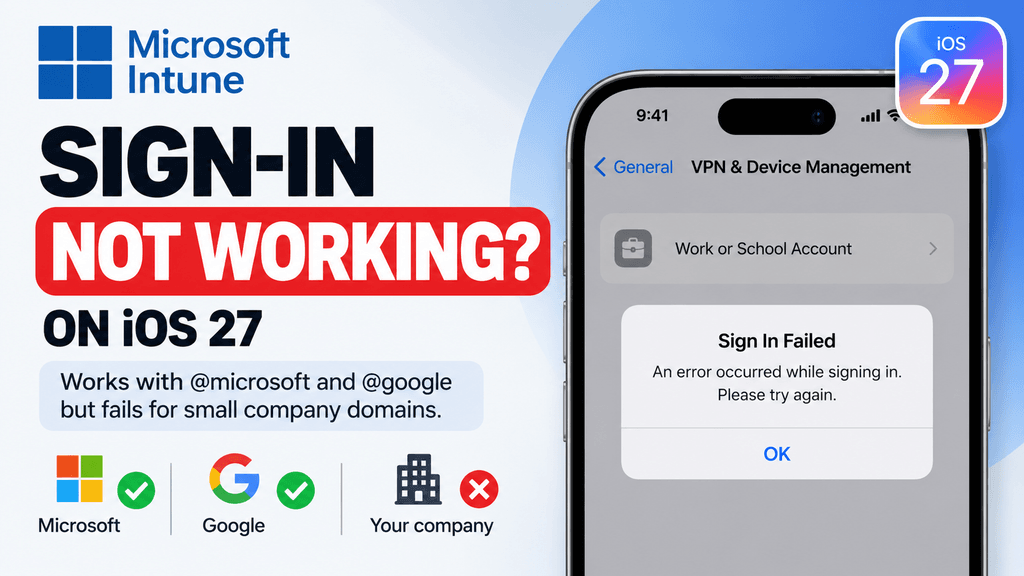
On several personal or unmanaged iPhones running iOS 27, we found that Intune enrollment failed immediately when signing in under Settings → General → VPN & Device Management → Work or School Account. The same enrollment flow worked successfully on older version, and a temporary workaround was to complete enrollment on the older iOS version first and then update the device to iOS 27.
At the time of testing, it was still unclear whether the underlying problem was caused by Apple, Microsoft Intune, or the interaction between the two.
This article documents exactly what was tested, what failed, and what currently works.
What is supposed to happen?
Microsoft’s supported account-driven enrollment process for personal iPhones is straightforward.
For Apple User Enrollment, Microsoft instructs users to open:
Settings → General → VPN & Device Management
Then sign in with the work or school account and continue through the remote-management prompts.
This enrollment method is designed for personal or BYOD iPhones and does not normally require the device to be reset.
On the affected iOS 27 devices, however, the process stopped much earlier.
What failed on iOS 27?
The problem appeared immediately after entering the work email address under:
Settings → General → VPN & Device Management → Work or School Account
Instead of continuing to authentication and remote-management setup, the sign-in process failed.
The important part is that this was not limited to one user or one device configuration.
The issue was reproduced under multiple test conditions.
What we tested
Several personal/unmanaged iPhones were tested.
The devices were reset repeatedly and configured in different ways:
- Restored from an existing backup
- Set up completely as new
- Configured without transferring data
- Tested with different work accounts
- Tested after multiple factory resets
The result on iOS 27 remained the same.
The failure appeared immediately after entering the work email address.
This makes a damaged backup or one specific user account much less likely as the explanation.
Another important pattern: Microsoft and Google domains work
During testing, we noticed another important difference.
Accounts using large well-known domains such as:
@microsoft.com@google.com
were able to continue through the sign-in flow successfully.
By contrast, accounts using smaller company domains failed immediately after the work email address was entered.
That suggests the problem may involve the way iOS 27 or Intune discovers the identity provider or enrollment configuration for custom company domains.
Possible areas involved could include:
- Microsoft Entra ID domain discovery
- Autodiscovery or federation behavior
- Managed Apple account / MDM discovery
- Intune enrollment configuration for custom domains
- DNS or tenant-domain resolution
- A change in iOS 27 authentication handling
At this stage, this is still only an observed pattern from our testing. It does not prove that small-company domains are the root cause.
The important finding is:
Large Microsoft/Google-style domains worked, while smaller company domains consistently failed in the same iOS 27 enrollment flow.
That is something worth testing separately because it gives administrators a much more specific reproduction path.
The same test worked on older versions.
The strongest comparison came from testing an older iOS version.
After resetting an iPhone running a older version, the same enrollment process worked successfully.
The work account could be added through:
Settings → General → VPN & Device Management
and the Intune enrollment could continue normally.
That suggests the issue is specifically connected to the newer iOS 27 environment rather than the basic account or Intune configuration.
It does not prove that iOS 27 itself is solely responsible, however.
The failure could still involve a compatibility problem between Apple’s enrollment framework and Microsoft Intune.
The workaround that worked
The temporary workaround was:
- Start with the iPhone on an older supported iOS version.
- Complete Intune enrollment through VPN & Device Management.
- Confirm that the management profile and work account are active.
- Update the iPhone to iOS 27.
- Check the management state again after the update.
In our testing, the device remained enrolled after upgrading to iOS 27.
So the problem appears to affect new enrollment on iOS 27, rather than automatically breaking devices that were already enrolled before the upgrade.
That distinction is important for IT administrators.
Does Microsoft officially support this enrollment method?
Yes.
Microsoft currently recommends account-driven Apple User Enrollment for new personal-device enrollments.
Its documentation explicitly instructs the user to open Settings → General → VPN & Device Management and sign in using a work or school account.
Microsoft also lists personal/BYOD iPhones as a supported scenario for Apple User and Device Enrollment.
So the problem is not that the enrollment method itself has become unsupported.
Read also: Gemini “Something Went Wrong (13)” Error: 7 Ways to Fix It
Is this a known Microsoft Intune issue?
At the time of writing, Microsoft’s public Intune known-issues page does not appear to document this exact iOS 27 failure.
Microsoft does list several other iOS enrollment limitations and known issues, including problems with web-based enrollment and JIT registration, profile installation, Apple Configurator, and enrollment-state synchronization.
But those documented issues do not directly match the behavior we observed:
email entered → immediate sign-in failure on iOS 27
That means administrators should avoid assuming there is already an official Microsoft fix for this particular problem.
Could Apple be the cause?
Possibly, but there is not enough evidence yet to say that.
Apple still documents configuration profiles and device-management settings under Settings → General → VPN & Device Management on iOS 27.
The fact that the enrollment menu remains present does not guarantee that every third-party MDM enrollment flow works identically after an OS update.
Major iOS releases can change:
- Authentication behavior
- Managed Apple account handling
- MDM APIs
- Enrollment flows
- Web authentication
- Security requirements
- Certificate behavior
But until Apple or Microsoft acknowledges the exact issue, blaming one vendor would be speculation.
What should IT administrators check first?
Before concluding that the issue is iOS 27-specific, check the normal Intune enrollment requirements.
Microsoft recommends validating:
- The user has the correct Intune license
- Enrollment restrictions allow iOS/iPadOS
- Personal devices are allowed
- The user has not exceeded the device enrollment limit
- Microsoft Entra credentials work
- The tenant’s MDM configuration is correct
- Existing stale device registrations are not interfering with enrollment
If the same account successfully enrolls an iOS 18.7 device but fails immediately on iOS 27, however, the OS-version difference becomes a much stronger troubleshooting signal.
Do not repeatedly reset the iPhone without testing the OS version
A factory reset may seem like the obvious troubleshooting step.
But our testing showed that resetting the iOS 27 devices did not resolve the issue.
The failure occurred:
- after a restored backup
- after a clean setup
- after multiple resets
- with different accounts
That means repeatedly wiping the same iOS 27 device may waste time.
A more useful test is to compare the same enrollment process on another iPhone running an older iOS version.
What if the iPhone is already enrolled before updating?
This is where the workaround becomes particularly useful.
In our testing, an iPhone that was successfully enrolled first could then be upgraded to iOS 27 without immediately losing the existing Intune management state.
So organizations preparing for a wider iOS 27 rollout may want to test this sequence:
Enroll first → verify management → update afterward
rather than:
Update first → attempt new enrollment
This should be treated as a temporary workaround, not a permanent deployment strategy.
What information should you collect for Microsoft support?
If your organization can reproduce this behavior, collect evidence before opening a Microsoft support case.
Useful information includes:
- Exact iPhone model
- iOS version
- Enrollment type
- Whether the device is personal/BYOD
- Exact point where authentication fails
- Screenshot of the error
- Whether the device was restored or set up as new
- Whether another user account fails
- Whether the same account works on iOS 18.7
- Whether enrollment works before upgrading to iOS 27
- Intune tenant enrollment restrictions
- Relevant Microsoft Entra sign-in logs
The comparison between iOS 18.7 working and iOS 27 failing is especially useful because it gives support engineers a clear reproduction path.
Bottom line
We were able to reproduce an Intune enrollment problem on several personal iPhones running iOS 27.
The failure occurred immediately after entering the work email address under:
Settings → General → VPN & Device Management → Work or School Account
Multiple resets, clean setups and different user accounts did not fix it.
The same enrollment process worked successfully on iOS 18.7.9
The temporary workaround that worked was:
Enroll the device on the older iOS version first, then update it to iOS 27.
At this stage, there is not enough evidence to say whether Apple or Microsoft Intune is ultimately responsible.
Microsoft’s current public documentation still supports account-driven Apple User Enrollment, and its known-issues page does not appear to list this exact iOS 27 behavior.
For now, organizations seeing the same issue should document the failure carefully and compare the result against an older iOS version before spending time on repeated resets.
We also observed that accounts using large domains such as @microsoft.com and @google.com could continue through the sign-in flow, while smaller company domains failed. This may point to a domain-discovery or identity-provider compatibility issue, but the exact cause is still unconfirmed.
Sources
Microsoft — Set up account-driven Apple User Enrollment
Microsoft enrollment guide
Microsoft — iOS/iPadOS device enrollment guide
Microsoft iOS enrollment guide
Microsoft — Apple device enrollment overview
Microsoft personal-device enrollment overview
Microsoft — Intune known issues
Microsoft Intune known issues
Apple — Configuration profiles on iPhone
Apple iPhone device-management documentation

Pingback: Gemini “Something Went Wrong (13)” Error: 7 Fixes
Pingback: Apple Mail Microsoft 365 not syncing? 7 Fixes