
Quick verdict
Choose NotebookLM when your main task is to work closely with a defined collection of documents. It is better organized for source-based research, offers direct citations to uploaded material, and includes built-in outputs such as Audio Overviews, flashcards, quizzes, reports, mind maps, and Video Overviews.
Choose ChatGPT when the document is only one part of a larger task. It is generally more flexible for rewriting, brainstorming, data analysis, comparing files, creating charts, combining uploaded material with web research, and producing new content from the information. ChatGPT Projects can also keep files, chats, and instructions together for ongoing work.
For straightforward PDF research, NotebookLM is usually the better starting point. For broader analysis and content creation, ChatGPT is usually more capable.
Testing disclosure: This comparison is based on current official documentation. TechJournalAI has not yet completed a controlled side-by-side test of every feature discussed below.
NotebookLM vs ChatGPT for PDFs: comparison table
| Area | NotebookLM | ChatGPT |
|---|---|---|
| Source grounding | Built specifically around selected notebook sources | Can use uploaded files, but may also draw on broader context depending on the task |
| PDF citations | Strong inline citations linked to source passages | Strongest citation workflow is in Deep Research; standard file chat is less source-navigation-focused |
| Research organization | Dedicated notebooks, sources, notes, and Studio outputs | Projects organize chats, files, links, and instructions |
| PDF text analysis | Good for summaries, questions, comparisons, and extraction | Good for summaries, extraction, transformation, comparison, and broader reasoning |
| PDF charts and images | Results depend on extraction and feature behavior | Native PDF visual retrieval is officially limited to Enterprise for embedded PDF visuals |
| Follow-up questions | Strong when questions stay within selected sources | More flexible for follow-up reasoning and work beyond the document |
| Study tools | Flashcards, quizzes, reports, Audio and Video Overviews | Study Mode, practice questions, explanations, and flashcard-style review |
| Audio features | Dedicated source-based Audio Overviews | Voice and Study Mode are available, but not the same document-podcast workflow |
| Data analysis | Limited compared with a dedicated analysis environment | Can analyze structured files, calculate results, and create tables and charts |
| Free limits | 100 notebooks, 50 sources each, 50 chats and 3 Audio Overviews daily | Free accounts currently have limited file uploads, officially listed as three per day |
| Best for | Studying and researching a fixed set of sources | Analysis, writing, transformation, data work, and broader research |
Features and usage limits can change, so confirm them before publishing screenshots or plan recommendations.
What is the main difference?
NotebookLM is a source-centered research workspace. A notebook contains a defined collection of sources, and the tool uses the complete set or the subset you select when answering questions. Each notebook is independent and cannot automatically access sources stored in another notebook.
ChatGPT is a general-purpose AI workspace that also supports files. You can upload PDFs and other documents into a conversation or Project, then ask ChatGPT to summarize, compare, extract information, rewrite content, apply a framework, analyze data, or create something new.
That distinction matters:
- NotebookLM starts with: What do these sources say?
- ChatGPT starts with: What do you want me to do?
Source grounding: NotebookLM is more focused
NotebookLM is designed to answer from the sources included in the notebook. Users can select or deselect sources before asking a question, which makes it easier to restrict an answer to one PDF or compare several specific documents.
For example, a notebook could contain:
- A product manual
- A security guide
- A pricing document
- Release notes
- An internal procedure
You can select only the manual when asking how a setting works, or select the manual and release notes when asking what changed.
ChatGPT can also use uploaded files as context. Projects allow users to keep related PDFs, spreadsheets, documents, images, instructions, and conversations in one workspace. However, ChatGPT remains a broader assistant rather than a source-only research interface.
Winner for source grounding: NotebookLM
NotebookLM makes the document collection more visible and gives the user clearer control over which sources are active.
ChatGPT is still useful for source-based work, but prompts should be more explicit:
Answer only from the uploaded documents. If the answer is not present, say so. Do not use outside knowledge.
Even with that instruction, important answers should still be checked.
PDF handling: both work well with text-based files
NotebookLM accepts PDFs and several other source formats. Its current documented limit is 500,000 words per source or 200 MB for a local upload, with no separate page limit. Copy-protected PDFs may fail to import.
ChatGPT supports common document formats and allows files of up to 512 MB. Text and document files are limited to two million tokens per file.
Both can perform tasks such as:
- Summarizing a PDF
- Extracting topics or quotations
- Finding references to a term
- Comparing two documents
- Explaining difficult sections
- Reformatting information
- Identifying headings or lists
OpenAI explicitly documents document synthesis, transformation, comparison, extraction, and metadata analysis as file-upload use cases.
Scanned PDFs remain a problem
A scanned PDF may contain page images without a usable text layer. Neither tool should be trusted to read every scan accurately.
Before uploading:
- Open the PDF.
- Try to select and copy a sentence.
- Paste it into a text editor.
- Run OCR first if the result is empty or unreadable.
Complex columns, handwriting, footnotes, and poorly scanned pages can also cause mistakes.
Read aslo : NotebookLM PDF Upload Failed? 7 Ways to Fix It
Charts and images inside PDFs: check your ChatGPT plan
This is an important limitation.
OpenAI states that ChatGPT Enterprise supports visual retrieval for PDFs, allowing it to interpret text along with embedded images, charts, graphs, and diagrams. On other ChatGPT plans, document retrieval is text-based, and embedded PDF images are discarded during processing.
This means a chart-heavy report may produce incomplete answers on a consumer ChatGPT plan even when the surrounding text is readable.
A practical workaround is to:
- Upload the PDF.
- Export the important chart as an image or take a clear screenshot.
- Upload that image separately.
- Ask ChatGPT to analyze the page text and image together.
NotebookLM can use direct text and images from sources in citations, but users should still test visual interpretation carefully rather than assuming every chart, table, or diagram was extracted correctly.
Winner for ordinary text PDFs: Tie
Winner for native visual PDF handling: ChatGPT Enterprise
For consumer plans, neither tool should be treated as guaranteed chart-extraction software.
Research organization: NotebookLM is cleaner for source libraries
NotebookLM organizes work into:
- Notebooks
- Sources
- Chat
- Notes
- Studio outputs
A notebook is intentionally limited to one project or topic. This makes it suitable for a course, research question, policy collection, product manual set, or client project.
Its main weakness is isolation. NotebookLM cannot automatically use information stored across different notebooks.
ChatGPT Projects provide a broader workspace. Users can add PDFs, documents, spreadsheets, images, pasted text, supported app links, and project-specific instructions. Project conversations can share that context, and useful responses can be saved back into the Project as sources.
NotebookLM is better for:
- A controlled source library
- Studying a fixed set of documents
- Navigating citations
- Producing source-derived learning materials
ChatGPT Projects are better for:
- Ongoing writing projects
- Combining research and drafting
- Working with documents and spreadsheets
- Keeping different conversations under one goal
- Adding custom behavior instructions
- Turning research into new deliverables
Winner: Depends on the workflow
NotebookLM has the cleaner research interface. ChatGPT Projects are more flexible.
Summaries: NotebookLM is grounded, ChatGPT is more adaptable
Both tools can summarize a PDF.
NotebookLM is better when the summary must remain close to the uploaded material. You can ask it to summarize specific sections, explain arguments, list evidence, or compare selected sources.
ChatGPT is better when the summary needs additional transformation, such as:
- Rewriting it for executives
- Turning it into an email
- Converting it into a presentation outline
- Adapting it for beginners
- Critiquing the reasoning
- Applying a framework
- Combining it with outside research
- Producing a content draft
OpenAI specifically describes summarization, rewriting, document transformation, comparison, and applying one document’s framework to another as supported file workflows.
Example prompt for NotebookLM
Summarize the report’s main conclusions. Separate evidence, assumptions, recommendations, and acknowledged limitations. Cite every section.
Example prompt for ChatGPT
Summarize this report for a department manager. Keep the factual findings separate from your recommendations. Then create a one-page action plan.
Winner for source-faithful summaries: NotebookLM
Winner for rewriting and repurposing: ChatGPT
Citations: NotebookLM has the stronger everyday workflow
NotebookLM answers can include inline citations based on direct quotes, text, and images from the selected sources. Users can hover over a citation to preview the supporting material or select it to navigate to the relevant location in the source.
This does not guarantee that the generated interpretation is correct. A citation can support only part of a sentence, or NotebookLM can overlook a qualification elsewhere in the document.
ChatGPT’s strongest documented citation workflow is Deep Research. Deep Research can work with uploaded files, websites, and connected apps, then produce a structured report with citations or source links.
Ordinary ChatGPT file conversations can extract quotations and document information, but the interface is not as consistently centered on source-linked navigation as NotebookLM.
Winner: NotebookLM
For routine PDF questions where source traceability matters, NotebookLM is easier to verify.
ChatGPT Deep Research is more suitable when uploaded documents must be combined with current web sources.
Follow-up questions: ChatGPT is more flexible
NotebookLM is strong at follow-up questions tied to the source collection:
- What evidence supports this conclusion?
- Where do the two reports disagree?
- Which policy applies to contractors?
- What does the appendix add?
- Which claims are not supported by data?
ChatGPT is stronger when the follow-up moves beyond the files:
- Is this recommendation consistent with current industry guidance?
- Turn this analysis into an implementation plan.
- Calculate the estimated cost from the spreadsheet.
- Rewrite the conclusion for a customer.
- Create Python code to process the extracted data.
- Research whether the regulation has changed.
Deep Research can combine uploaded files with web sources and enabled apps, while ChatGPT’s data-analysis tools can work with structured files and produce tables or charts.
Winner: ChatGPT
NotebookLM handles document interrogation well. ChatGPT handles the next stage of the work better.
Audio and study features: NotebookLM offers more document-specific outputs
NotebookLM includes dedicated tools for turning sources into:
- Audio Overviews
- Video Overviews
- Reports
- Flashcards
- Quizzes
- Mind maps
- Infographics
- Slide decks
These outputs are built around the notebook’s sources.
This makes NotebookLM useful for students, trainers, and anyone who needs to review the same material in several formats.
ChatGPT offers Study Mode on all plans. Study Mode can guide users through topics, ask questions, explain concepts step by step, reference uploaded study materials, and create quizzes or flashcard-style review.
The difference is practical:
- NotebookLM creates source-based study artifacts
- ChatGPT behaves more like an interactive tutor
Choose NotebookLM when:
- You want an Audio Overview of the PDFs
- You want a ready-made quiz or flashcard set
- You want a report or mind map generated from the sources
- You need to revisit a fixed source collection
Choose ChatGPT when:
- You want explanations adjusted to your level
- You want Socratic questioning
- You want feedback on your answers
- You need help solving problems step by step
- You want the discussion to move beyond the document
Winner for generated study materials: NotebookLM
Winner for interactive tutoring: ChatGPT
Data analysis: ChatGPT is substantially stronger
NotebookLM can extract and summarize information from sources, but it is not primarily a computational analysis environment.
ChatGPT can analyze uploaded spreadsheets and structured data, perform calculations, create tables, produce charts, group records, and investigate patterns.
For example, a business report may include a PDF and a CSV file.
NotebookLM is suitable for:
- Explaining the PDF
- Comparing written conclusions
- Creating a briefing document
ChatGPT is better for:
- Calculating totals from the CSV
- Visualizing trends
- Checking whether the data supports the PDF’s claims
- Creating a revised report
- Producing formulas or code
Winner: ChatGPT
Privacy considerations
Neither tool should be treated as an approved location for confidential files without checking the relevant account type, settings, and organizational policy.
NotebookLM privacy
Google states that personal NotebookLM data is not used to train NotebookLM unless the user provides feedback. When feedback is submitted, Google may review the full interaction context, including queries, uploads, and model responses. For qualifying Workspace and Workspace for Education accounts, Google states that uploads, queries, and responses are not reviewed by human reviewers and are not used to train AI models.
ChatGPT privacy
For consumer ChatGPT services, OpenAI states that uploaded files and other content may be used to improve models depending on the user’s settings. Users can disable Improve the model for everyone in Data Controls, after which new conversations are not used for training. Temporary Chat also does not appear in history, create memories, or train models.
OpenAI states that content from business offerings such as ChatGPT Business and Enterprise is not used to improve model performance by default.
Uploaded ChatGPT files are tied to the retention rules of the relevant chat or workspace. OpenAI states that files associated with a deleted chat are normally deleted from its systems within 30 days, subject to stated legal, security, or de-identification exceptions.
Before uploading either document
Check whether the file contains:
- Customer data
- Employee information
- Medical information
- Financial records
- Confidential contracts
- Trade secrets
- Unpublished research
- Credentials or access keys
- Material restricted by copyright or licensing
Redact unnecessary data and confirm that the service is permitted by your employer, school, client, or regulator.
Winner: Neither universally
Privacy depends more on account type, settings, and organizational controls than on the product name.
Free-plan limitations
NotebookLM Standard
Google currently documents the following Standard limits:
- 100 notebooks
- Up to 50 sources per notebook
- Up to 500,000 words per source
- 50 chat queries per day
- Three Audio Overview generations per day
- Local uploads up to 200 MB
Higher tiers increase limits and may add premium capabilities, but exact entitlements depend on the Google AI, Workspace, Education, or Cloud plan.
ChatGPT Free
OpenAI currently documents a limit of three file uploads per day for Free users. It also states that upload limits may be reduced during peak periods.
Study Mode is available on all ChatGPT plans, but it follows the account’s normal message, model, file, and rate limits.
Paid ChatGPT plans provide broader limits and access, but Project capacities and tool quotas vary by plan and can change.
Winner for free document-heavy work: NotebookLM
NotebookLM’s free tier is more practical when you need to maintain many source collections and question documents regularly.
ChatGPT Free is suitable for occasional uploads, but three files per day is restrictive for larger research tasks.
Which tool should you use?
Use NotebookLM when you need to:
- Study several PDFs
- Keep a source library organized
- Ask questions grounded in specific documents
- Verify answers through source citations
- Generate Audio Overviews
- Create flashcards, quizzes, reports, or mind maps
- Compare several versions of a policy or report
- Avoid mixing source analysis with unrelated tasks
Use ChatGPT when you need to:
- Rewrite or repurpose document content
- Analyze spreadsheets alongside PDFs
- Create charts, calculations, or code
- Combine documents with current web research
- Draft reports, emails, plans, or presentations
- Receive interactive tutoring
- Apply a rubric or framework
- Continue from research into implementation
Use both when the task is important
A practical combined workflow is:
- Add the source collection to NotebookLM.
- Ask grounded questions and verify the citations.
- Save the confirmed findings.
- Move only the necessary findings into ChatGPT.
- Use ChatGPT to calculate, rewrite, structure, or expand the work.
- Recheck any final factual claims against the original documents.
Do not transfer sensitive material between services unless both uses are authorized.
Final recommendation
For readers comparing NotebookLM vs ChatGPT for PDFs, NotebookLM is the better choice when the PDF itself is the main object of study. Its source selection, notebook structure, citations, and built-in learning outputs make document research easier to manage.
ChatGPT is better when reading the PDF is only the first step. It offers more flexibility for analysis, writing, data work, outside research, and producing a finished deliverable.
There is no universal winner:
- Choose NotebookLM for grounded document research.
- Choose ChatGPT for broader analysis and creation.
- Use both for complex workflows where traceability and flexible output are equally important.
Frequently asked questions
Is NotebookLM more accurate than ChatGPT for PDFs?
Not automatically. NotebookLM is more explicitly grounded in selected sources and provides a stronger citation interface, which makes errors easier to identify. Both tools can still misread, omit, or oversimplify information.
Can ChatGPT cite an uploaded PDF?
ChatGPT can extract quotations and information from uploaded files. Deep Research provides a documented report with citations or source links. Standard file chat is not as consistently designed around direct source navigation as NotebookLM.
Which is better for students?
NotebookLM is better for creating source-based flashcards, quizzes, summaries, Audio Overviews, and study guides. ChatGPT is better for interactive explanations, step-by-step guidance, and feedback on answers.
Which tool is better for a scanned PDF?
Neither is ideal if the scan has no reliable text layer. Run OCR first or upload clear images of the relevant pages.
Can NotebookLM search the web?
NotebookLM is primarily organized around notebook sources and can also help discover sources through supported source-discovery features. ChatGPT Deep Research is more suitable when the task requires combining uploaded files with broad or site-specific web research.
Which free plan is better for PDFs?
NotebookLM currently offers more generous source organization and daily document-questioning limits. ChatGPT Free officially limits users to three file uploads per day.
Suggested external sources
- Google NotebookLM Help: Learn about NotebookLM
- Google NotebookLM Help: Use chat
- Google NotebookLM Help: Add sources
- Google NotebookLM Help: NotebookLM limits
- Google NotebookLM Help: Privacy and Terms
- OpenAI Help: File Uploads FAQ
- OpenAI Help: Projects in ChatGPT
- OpenAI Help: Deep Research
- OpenAI Help: Study Mode
- OpenAI Help: Data Controls
- OpenAI Help: Visual Retrieval with PDFs
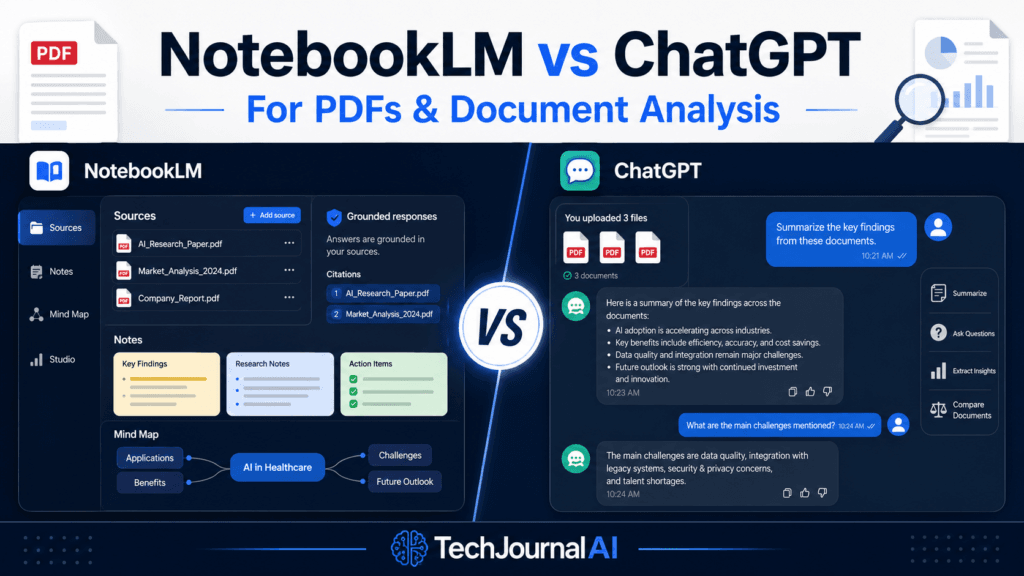
A split-screen comparison showing NotebookLM on the left and ChatGPT on the right. A PDF sits in the center. The NotebookLM side highlights citations, notebooks, flashcards, and Audio Overviews. The ChatGPT side highlights document analysis, charts, writing, and web research. Avoid using a winner’s trophy because the recommendation depends on the use case.

Pingback: NotebookLM PDF Upload Failed? 7 Ways to Fix It
Pingback: How to Use Perplexity for Reliable Research
Pingback: ChatGPT File Upload Failed? 9 Fixes That Work