
Gemini Spark is Google’s attempt to turn Gemini from an assistant that answers questions into an AI agent that can keep working on tasks in the background.
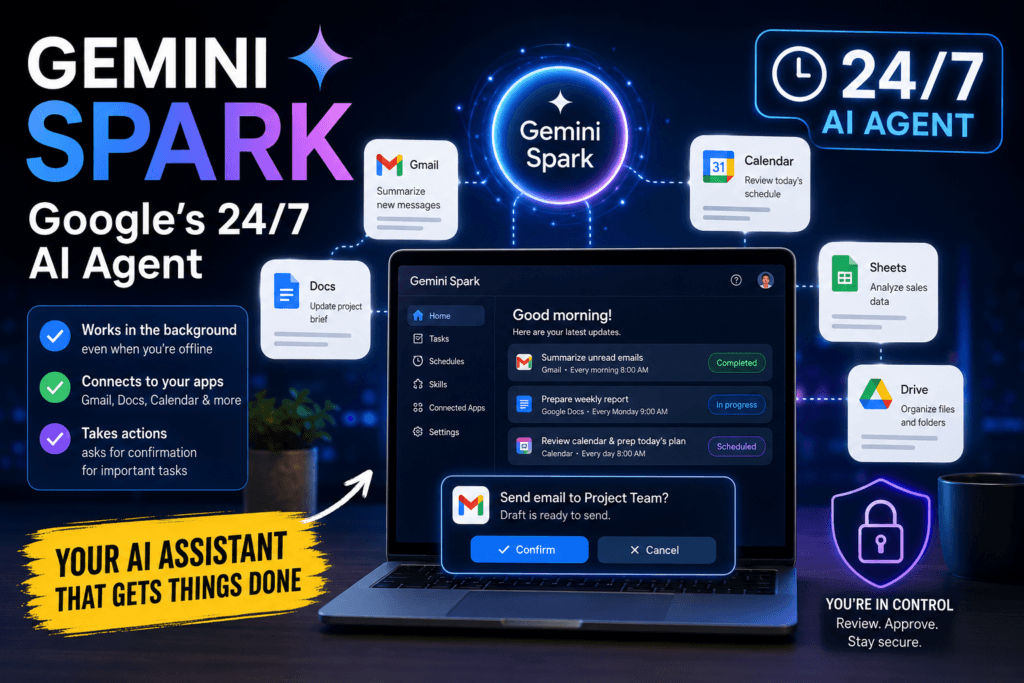
Google describes Spark as a 24/7 personal AI agent that can manage workflows, handle scheduled tasks, connect to apps, and take certain actions on your behalf. Unlike a normal chatbot, it can continue working even when your laptop is closed or your phone is locked because the agent runs in Google’s cloud infrastructure.
The idea is powerful, but it also raises an obvious question: how much access should you give an autonomous AI system?
Quick answer: What can Gemini Spark do?
Gemini Spark can currently help with tasks such as:
- Managing ongoing workflows
- Scheduling recurring tasks
- Working with Gmail, Docs, Slides, Sheets and other connected services
- Reading and editing supported files
- Using information from connected apps
- Following reusable instructions called skills
- Working with third-party apps through supported connections
- Continuing tasks in the background
Google says Spark uses Gemini 3.5 and its Antigravity platform to carry out multi-step tasks over longer periods.
How is Gemini Spark different from normal Gemini?
Normal Gemini is mostly reactive.
You ask:
Summarize these emails.
Gemini responds.
Spark can be given a broader goal such as:
Every Monday morning, review my unread project emails, summarize what needs attention and prepare a list of actions.
It can then run that workflow on a schedule rather than waiting for a new prompt each time.
Google says Spark can automate complex workflows and manage schedules for ongoing tasks.
That makes it closer to an autonomous assistant than a conventional AI chat.
Google is also adding agent-style functionality directly to Search.
Can Spark really work when your device is off?
Yes, according to Google.
Spark runs on dedicated virtual machines in Google Cloud, so the task does not depend on your phone or laptop remaining active. Google specifically says it can continue working when a laptop is closed or a phone is locked.
This is useful for long-running tasks, but it also means the agent may continue operating without you actively watching each step.
What kind of tasks can it handle?
Scheduled tasks
Spark supports schedules for recurring work.
For example:
Every weekday at 8:00, collect the important items from my calendar and prepare a short morning brief.
Google provides dedicated controls for creating and managing scheduled Spark tasks.
Email and calendar workflows
Spark can work with connected Google services.
A possible workflow could be:
Find emails from suppliers containing delivery delays and create a summary before my weekly meeting.
Google says Spark can integrate with Gmail, Docs, Slides and other Workspace tools. It is designed to ask for approval before high-stakes actions such as sending an email or adding calendar events.
That confirmation step is important. An AI drafting an email is very different from an AI sending it automatically.
Documents and spreadsheets
Google’s current Spark updates show support for tasks such as:
- Editing private spreadsheets
- Editing presentations
- Reading spreadsheet comments
- Editing shared documents and spreadsheets
These capabilities are still evolving, so exact support can change quickly.
Custom workflows
Spark can also use reusable skills.
A skill is essentially a set of instructions explaining how a task should be completed and what tools should be used. For example, a company could create a skill describing how to prepare a weekly sales summary.
This makes Spark more useful for repeated processes than ordinary one-off prompts.
Coding agents are using a similar approach to multi-step autonomous work.
Can it connect to non-Google apps?
Yes, but this is more advanced.
Google supports custom Connected Apps for Spark through MCP, or Model Context Protocol. That allows users to link certain personal or third-party tools into Spark workflows.
This could eventually allow workflows that cross several services.
For example:
Check my project board, compare overdue tasks with my calendar and create a summary document.
The downside is obvious: every additional connection gives the agent access to more information and potentially more actions.
Read also : Gemini File Upload Failed? 8 Ways to Fix It
What is useful about Gemini Spark?
It can automate repetitive work
The strongest use case is not asking questions.
It is removing repetitive steps from tasks such as:
- Reviewing information
- Preparing summaries
- Monitoring recurring work
- Updating documents
- Organizing schedules
- Collecting information across apps
For people already using Google services heavily, this could save meaningful time.
It can continue without supervision
Because Spark works in the cloud, users do not need to leave a computer running while it completes longer jobs.
That is especially useful for background research, scheduled summaries and recurring workflows.
It can work across several Google services
Google has an advantage here because Gmail, Calendar, Drive, Docs, Sheets and Slides are already widely connected.
A capable agent that can safely work across those tools could eliminate a large amount of manual copying between applications.
What could go wrong?
This is where Spark becomes more interesting—and more risky.
1. The agent can misunderstand the task
AI agents do not need to be malicious to cause problems.
A vague instruction such as:
Clean up my old files.
could mean something very different to the user and the agent.
The more autonomy an AI system receives, the more important it becomes to define:
- What it can access
- What it can modify
- What it can delete
- What requires confirmation
- What it should never touch
Do not give an autonomous agent broad instructions when the consequences are difficult to reverse.
2. Connected apps increase privacy exposure
Google says Spark can use information from sources including connected apps, chats, websites where the user is signed in, Personal Intelligence and location information.
That can make the agent far more useful, but it also creates a much larger pool of personal data.
Before connecting an app, ask whether Spark genuinely needs access to it.
An agent preparing travel plans may need Calendar access. It probably does not need access to every work document you own.
3. High-stakes actions still require caution
Google says Spark is designed to confirm certain major actions before carrying them out. Examples include sending emails and adding calendar events.
That is a useful safeguard, but users should not assume that every consequential action will always receive perfect protection.
AI systems can misunderstand context.
Always review:
- Recipients
- Dates
- Attachments
- Financial information
- Documents being edited
- Content being shared externally
before approving an action.
4. A bad workflow can repeat the same mistake
Scheduled automation creates a new type of problem.
If a manually triggered AI task makes one mistake, you may notice it immediately.
If a scheduled Spark workflow contains a bad instruction, the same mistake could potentially repeat every day or week.
Review scheduled tasks regularly and disable anything you no longer need.
5. Third-party connections increase security risk
Connecting outside services through MCP can make Spark substantially more powerful.
It also creates additional trust relationships.
A weak or compromised connected service could expose information or create unexpected actions.
Users should connect only services they trust and remove connections that are no longer required.
Privacy: what information can Gemini use?
Gemini Apps can process information users provide as well as data from connected services when the user enables those integrations.
Google maintains a dedicated Gemini Apps Privacy Hub explaining how data is processed and how Gemini Apps Activity and other controls work.
For Spark specifically, pay attention to:
- Gemini Apps Activity
- Connected Apps
- Personal Intelligence
- Location permissions
- Custom third-party connections
- Files accessible through Workspace
- Scheduled tasks
Do not use Spark with confidential company information unless your organization has approved it.
Who can use Gemini Spark?
Availability is still limited compared with the standard Gemini app.
Google initially announced Spark for trusted testers and Google AI Ultra subscribers in the United States.
Google has since continued expanding Spark and publishing support documentation, but plan, country and account requirements can change.
Before subscribing specifically for Spark, check the current Gemini plan page and whether the feature is available in your region.
Who should use Gemini Spark?
Spark makes the most sense for:
- People deeply invested in Google Workspace
- Users with repetitive digital workflows
- Professionals who manage many recurring tasks
- People comfortable reviewing AI-generated actions
- Advanced users who understand app permissions
Who should avoid it?
Spark is less suitable for users who:
- Do not want an AI system accessing personal services
- Work with highly sensitive information
- Rarely perform repetitive digital tasks
- Are uncomfortable reviewing automated actions
- Need deterministic results every time
- Cannot easily undo mistakes
A normal Gemini conversation may be safer and simpler for occasional tasks.
Is Gemini Spark the future of AI assistants?
Possibly, but the more important change is not the model itself.
The shift is from:
AI that answers
to:
AI that acts
That brings much more practical value, but also much more responsibility.
An incorrect chatbot answer is annoying.
An autonomous agent sending the wrong email, changing the wrong spreadsheet or executing the wrong recurring task is potentially much more serious.
Final recommendation
Gemini Spark is one of Google’s clearest attempts to make AI genuinely useful beyond chat.
Its ability to run continuously, manage scheduled workflows and work across connected services could save significant time.
But users should start cautiously.
Give Spark one clearly defined task, keep permissions narrow, require confirmation for important actions and review the results before expanding the workflow.
The best way to use Spark is not to give it control of your entire digital life.
Start with one repetitive task that is easy to verify and easy to undo.
Related Articles
Google AI Search Agents: What Can They Actually Do?

Pingback: Hostinger Review: Cheap Hosting, But Is It Actually Good?
Pingback: NotebookLM PDF Upload Failed? 7 Ways to Fix It
Pingback: Gemini File Upload Failed? 8 Ways to Fix It
Pingback: Claude Text Watermark: Can AI-Written Text Be Detected?
Pingback: Gemini “Something Went Wrong (13)” Error: 7 Fixes
Pingback: What Is Gemini 4 Argon? Google’s New Flagship AI Explained
Pingback: Why OpenAI, Anthropic and Google Are Working Together on AI Safety